
插入查询结果
语法:
insert into table_name column select…
案例:创建一张用户表,设计有name姓名、email邮箱、sex性别、mobile手机号字段。需要把已有的 学生数据复制进来,可以复制的字段为name、_mail
– 创建用户表
DROP TABLE IF EXISTS test_user;
CREATE TABLE test_user (
id INT primary key auto_increment,
name VARCHAR(20) comment ‘姓名’,
age INT comment ‘年龄’,
email VARCHAR(20) comment ‘邮箱’,
sex varchar(1) comment ‘性别’,
mobile varchar(20) comment ‘手机号’
);
–把学生表中的所有数据复制到用户表
insert into test_user(name,email) select name,_mail from student;
四、查询
========
4.1聚合查询
4.1.1、聚合函数
常见的统计总数、计算平局值等操作,可以使用聚合函数来实现,常见的聚合函数有:
COUNT
– 统计班级共有多少同学
select count(*) from student;
select count(0) from student;
– 统计班级收集的 _mail 有多少个,_mail 为 NULL 的数据不会计入结果
select count(_mail) from student;
SUM
– 统计数学成绩总分
select sum(math) from exam_result;
– 不及格 < 60 的总分,没有结果,返回 NULL
select sum(math) from exam_result where math < 60;
AVG
– 统计平均总分
select avg(chinese + math + english) 平均总分 from exam_result;
MAX
– 返回英语最高分
select max(english) from exam_result;
MIN
– 返回 > 70 分以上的数学最低分
select min(math) from exam_result where math > 70;
4.1.2、GROUP BY子句
SELECT 中使用 GROUP BY 子句可以对指定列进行分组查询。需要满足:使用 GROUP BY 进行分组查 询时,SELECT 指定的字段必须是“分组依据字段”,其他字段若想出现在SELECT 中则必须包含在聚合函 数中。
select column1, sum(column2), … from table group by column1,column3;
准备测试表及数据:职员表,有id(主键)、name(姓名)、role(角色)、salary(薪水)
create table emp(
id int primary key auto_increment,
name varchar(20) not null,
role varchar(20) not null,
salary numeric(11,2)
);
insert into emp(name, role, salary) values
(‘李白’,‘服务员’, 1000.20),
(‘杜甫’,‘游戏陪玩’, 2000.99),
(‘孙悟空’,‘游戏角色’, 999.11),
(‘猪无能’,‘游戏角色’, 333.5),
(‘沙和尚’,‘游戏角色’, 700.33),
(‘隔壁老王’,‘董事长’, 12000.66);
查询每个角色的最高工资、最低工资和平均工资
select role,max(salary),min(salary),avg(salary) from emp group by role;

4.1.3、HAVING
GROUP BY 子句进行分组以后,需要对分组结果再进行条件过滤时,不能使用 WHERE 语句,而需要用 HAVING
显示平均工资低于1500的角色和它的平均工资
select role,max(salary),min(salary),avg(salary) from emp group by role having avg(salary) < 1500;

4.2、联合查询
实际开发中往往数据来自不同的表,所以需要多表联合查询。多表查询是对多张表的数据取笛卡尔积:

测试示例:
insert into classes(name, ) values
(‘计算机系2019级1班’, ‘学习了计算机原理、C和Java语言、数据结构和算法’),
(‘中文系2019级3班’,‘学习了中国传统文学’),
(‘自动化2019级5班’,‘学习了机械自动化’);
create table classes(
name varchar(20),
varchar(200)
);
create table student(
id int,
sn varchar(6),
name varchar(20),
_mail varchar(20),
classes_id int
);
insert into student(id,sn, name, _mail, classes_id) values
(1,‘09982’,‘黑旋风李逵’,‘’,1),
(2,‘00835’,‘菩提老祖’,null,1),
(3,‘00391’,‘白素贞’,null,1),
(4,‘00031’,‘许仙’,‘’,1),
(5,‘00054’,‘不想毕业’,null,1),
(6,‘51234’,‘好好说话’,‘’,2),
(7,‘83223’,‘tellme’,null,2),
(8,‘09527’,‘老外学中文’,‘’,2);
create table course(
id int primary key auto_increment,
name varchar(20)
);
insert into course(id,name) values
(1,‘Java’),(2,‘中国传统文化’),(3,‘计算机原理’),(4,‘语文’),(5,‘高阶数学’),(6,‘英文’);
create table score(
score decimal(3,1),
student_id int,
course_id int
);
insert into score(score, student_id, course_id) values
– 黑旋风李逵
(70.5, 1, 1),(98.5, 1, 3),(33, 1, 5),(98, 1, 6),
– 菩提老祖
(60, 2, 1),(59.5, 2, 5),
– 白素贞
(33, 3, 1),(68, 3, 3),(99, 3, 5),
– 许仙
(67, 4, 1),(23, 4, 3),(56, 4, 5),(72, 4, 6),
– 不想毕业
(81, 5, 1),(37, 5, 5),
– 好好说话
(56, 6, 2),(43, 6, 4),(79, 6, 6),
– tellme
(80, 7, 2),(92, 7, 6);
4.2.1、内连接
语法:
select 字段 from 表1 别名1 [inner] join 表2 别名2 on 连接条件 and 其他条件;
select 字段 from 表1 别名1,表2 别名2 where 连接条件 and 其他条件;
案例:
查询“许仙”同学的 成绩
select sco.score from student stu inner join score sco on stu.id=sco.student_id
and stu.name=‘许仙’;
– 或者
select sco.score from student stu, score sco where stu.id=sco.student_id and
stu.name=‘许仙’;

初学者建议一步一步来
select student.id,student.name ,score.student_id,score.score from student,score;

select student.id,student.name ,score.student_id,score.score from
student,score where student.id = score.student_id;


select student.id,student.name ,score.student_id,score.score from
student,score where student.id = score.student_id and student.name = ‘许仙’;

(2)查询所有同学的总成绩,及同学的个人信息:
SELECT
stu.sn,
stu.NAME,
stu._mail,
sum( sco.score )
FROM
student stu
JOIN score sco ON stu.id = sco.student_id
GROUP BY
sco.student_id;

select student.id ,student.name,score.student_id,score.score from student,score;

select student.id ,student.name,score.student_id,score.score from student,score
where student.id = score.student_id;

select student.id ,student.name,score.student_id,score.score from student,score
where student.id = score.student_id group by student.id;

select student.id ,student.name,sum(score.score) from student,score
where student.id = score.student_id group by student.id;

(3)查询所有同学的成绩,及同学的个人信息:
select student.id,student.name,course.id,course.name,score.student_id,score.score from
student,course,score;

select student.id,student.name,course.id,course.name,score.student_id,score.score from
student,course,score where student.id = score.student_id;


select student.id,student.name,course.id,course.name,score.student_id,score.score from
student,course,score where student.id = score.student_id and course.id = score.course_id;

select student.name,course.name,score.score from
student,course,score where student.id = score.student_id and course.id = score.course_id;

4.2.2、自连接
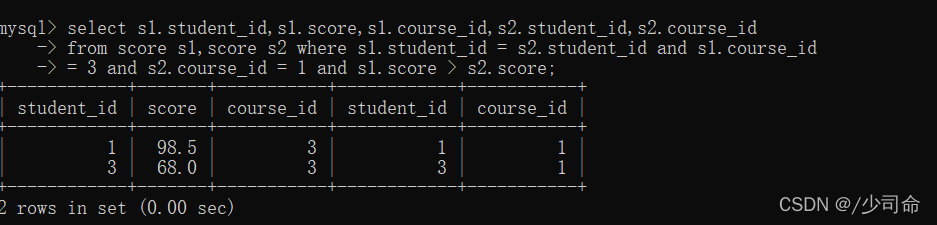
显示所有“计算机原理”成绩比“Java”成绩高的成绩信息
select * from course where name = ‘java’;
select * from course where name = ‘计算机原理’;

select s1.student_id,s1.score,s1.course_id,s2.student_id,s2.course_id
from score s1,score s2;

select s1.student_id,s1.score,s1.course_id,s2.student_id,s2.course_id
from score s1,score s2 where s1.student_id = s2.student_id;


select s1.student_id,s1.score,s1.course_id,s2.student_id,s2.course_id
from score s1,score s2 where s1.student_id = s2.student_id and s1.course_id
= 3 and s2.course_id = 1;

select s1.student_id,s1.score,s1.course_id,s2.student_id,s2.course_id
from score s1,score s2 where s1.student_id = s2.student_id and s1.course_id
= 3 and s2.course_id = 1 and s1.score > s2.score;
4.2.3、子查询
查询与“不想毕业” 同学的同班同学
select classes_id from student where name = ‘不想毕业’;

select name from student where classes_id = (select classes_id from student where name = ‘不想毕业’);

版权声明:本文内容由互联网用户自发贡献,该文观点仅代表作者本人。本站仅提供信息存储空间服务,不拥有所有权,不承担相关法律责任。如发现本站有涉嫌侵权/违法违规的内容, 请发送邮件至 举报,一经查实,本站将立刻删除。
如需转载请保留出处:https://bianchenghao.cn/bian-cheng-ri-ji/39918.html