
❤️作者主页:小虚竹
❤️作者简介:大家好,我是小虚竹。Java领域优质创作者🏆,CSDN博客专家🏆,华为云享专家🏆,掘金年度人气作者🏆,阿里云专家博主🏆
❤️技术活,该赏
❤️点赞 👍 收藏 ⭐再看,养成习惯
Intellij IDEA使用教程相关系列 目录
配置操作
第一步操作
如图:选择右侧的database页签,一般在idea的右边会有Database界面,点击它即可。
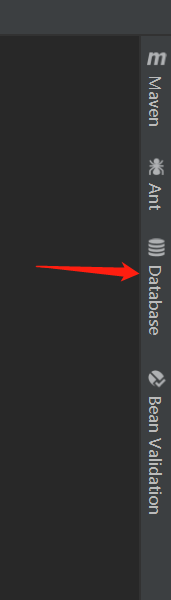
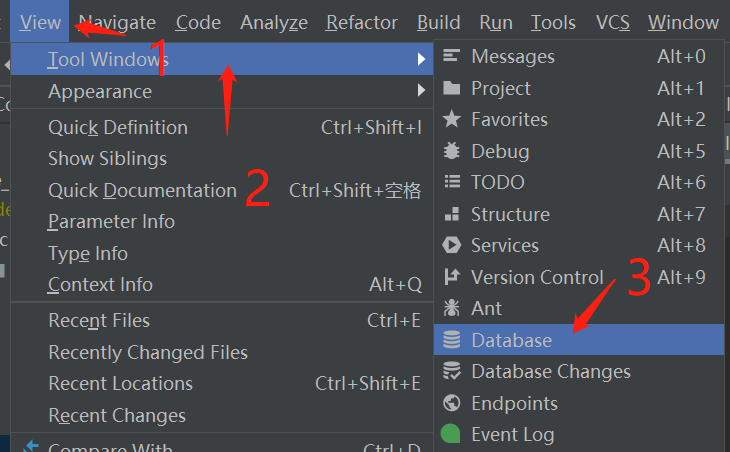
有时候我们会发现这个DataBase在右侧页签没有,要设置一下,才会出现,设置的方法如下:
在这里可以打开
View==>Tool Windows ==> Database
如图所示:
第二步操作
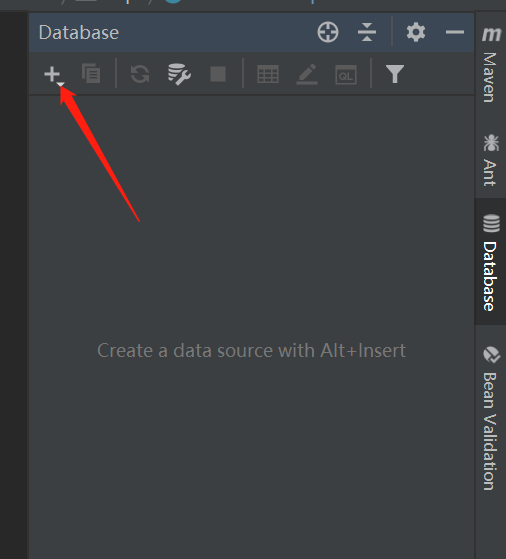
如图所示:点击加号,可以添加数据库的配置
第三步操作
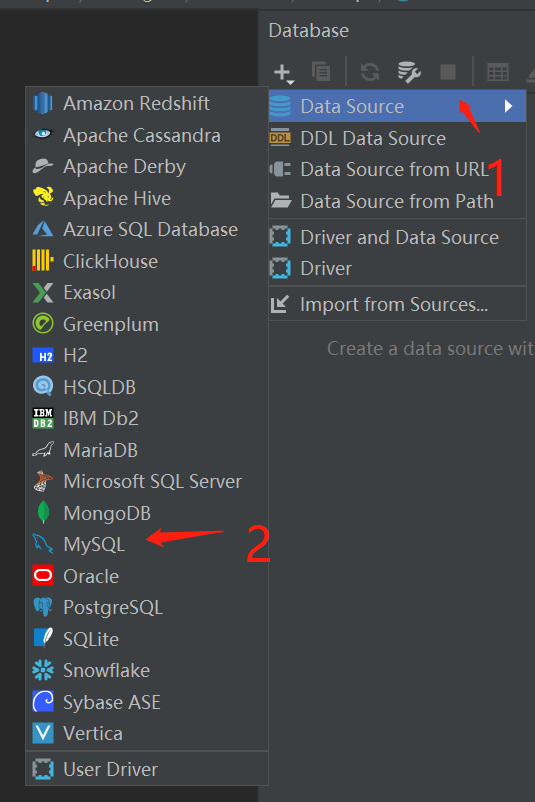
如图所示:选择data source–>再选择mysql
第四步操作
如图所示:输入数据库信息:地址,用户名,密码,数据库名
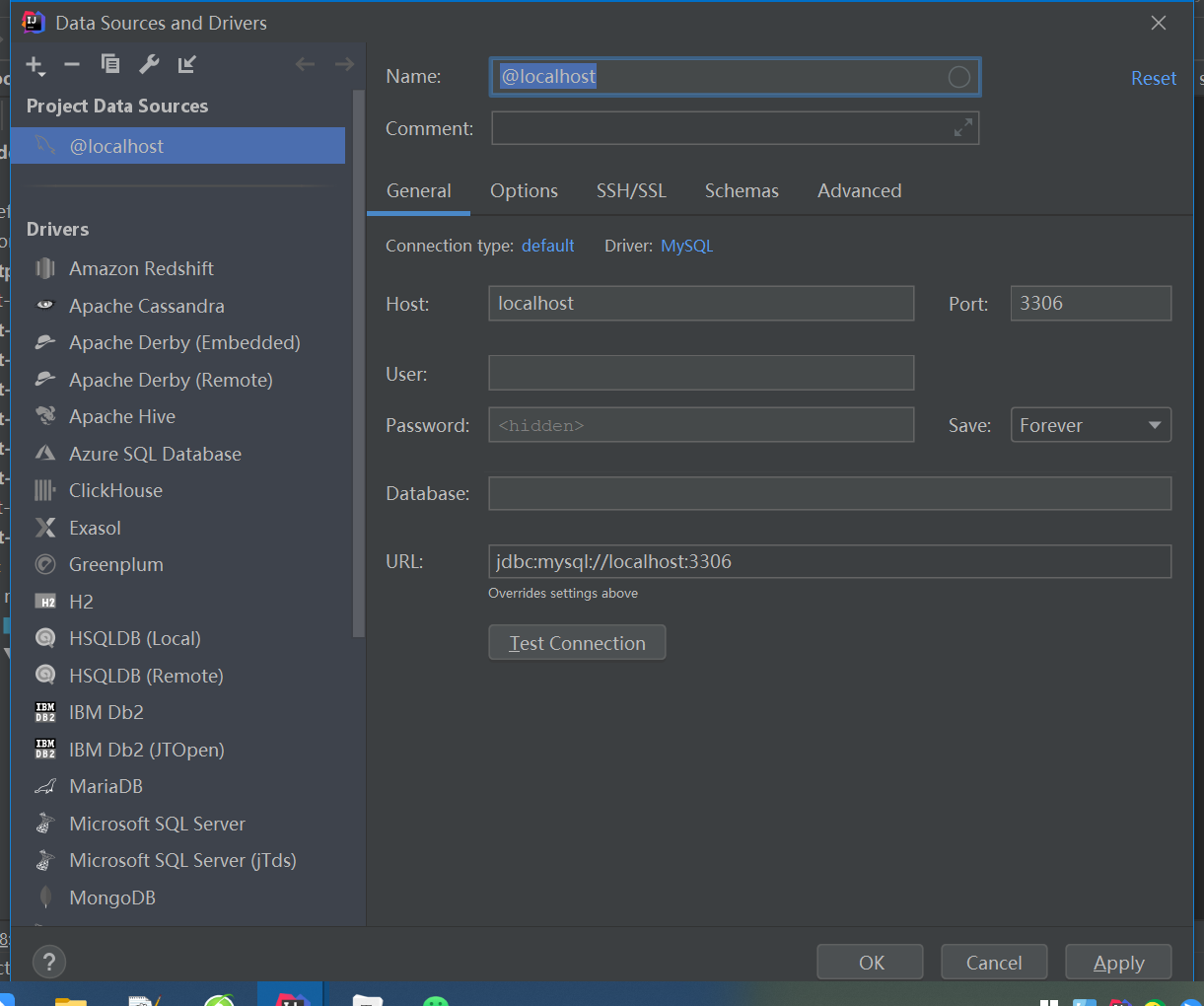
我给了一个样例,可以参考参考
jdbc:mysql://127.0.0.1:3306/xxx?useUnicode=true&characterEncoding=utf-8&useSSL=false
xxx为自定义的数据库
如图所示:配置后点击test connection
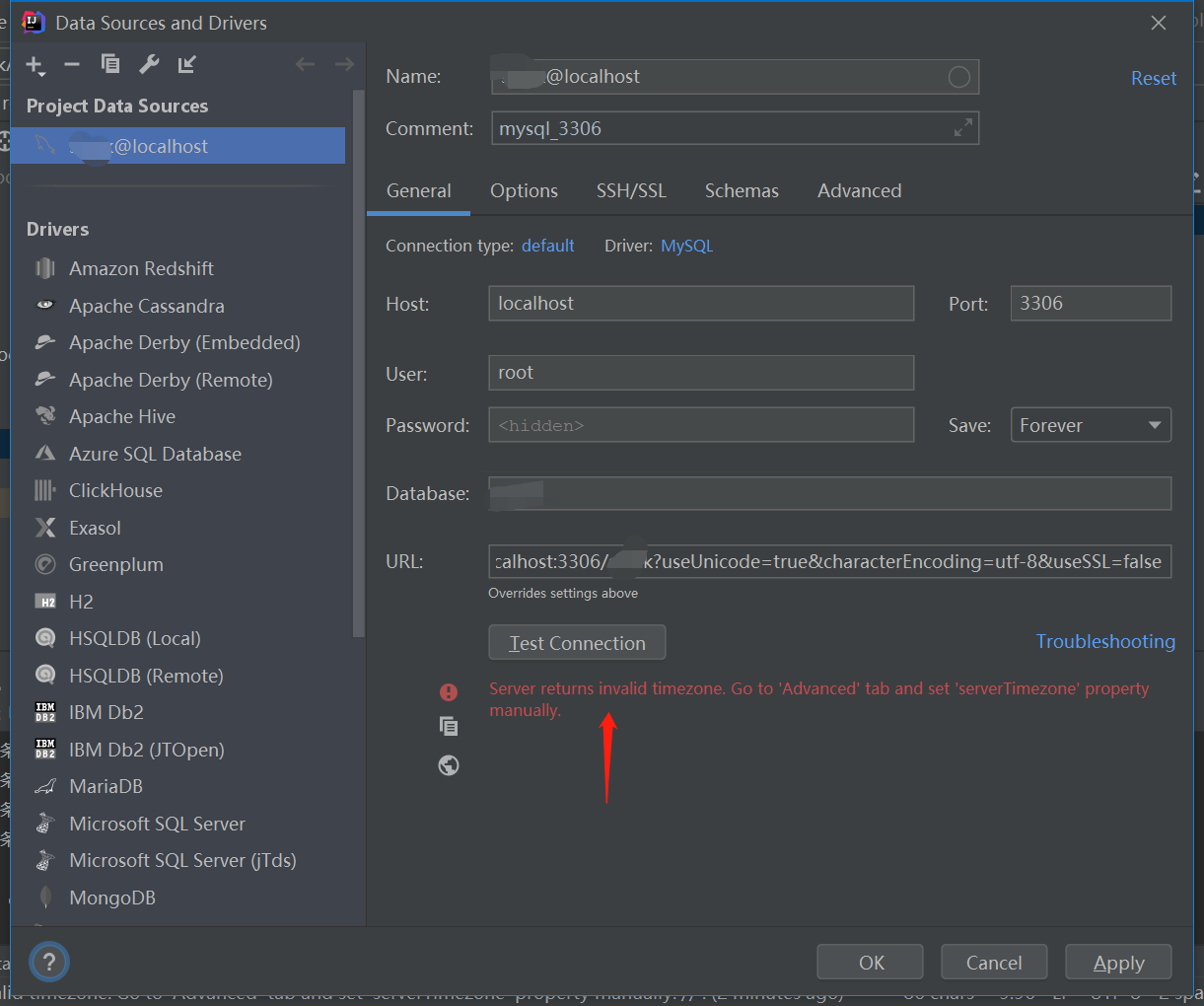
报错了
Server returns invalid timezone. Go to 'Advanced' tab and set 'serverTimezone' property manually.
解决方案:
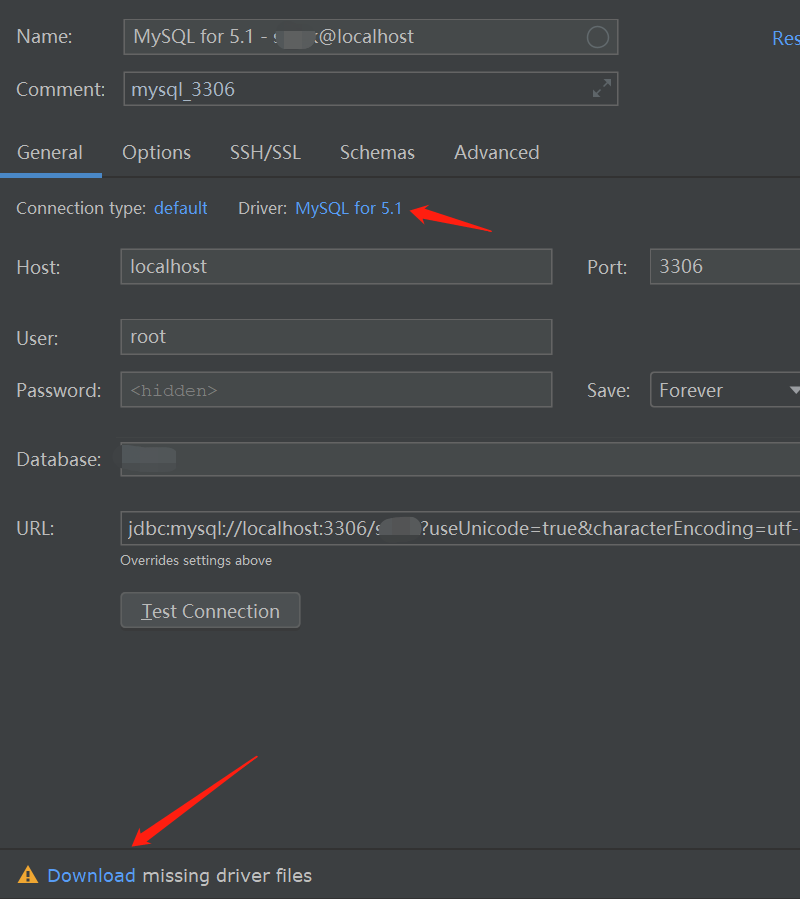
本机安装的mysql版本是5.7的,那么IDEA要连接mysql也应该匹配下驱动版本。把Driver改成MySQL for 5.1就可以了
如图所示:driver:选择mysql for 5.1
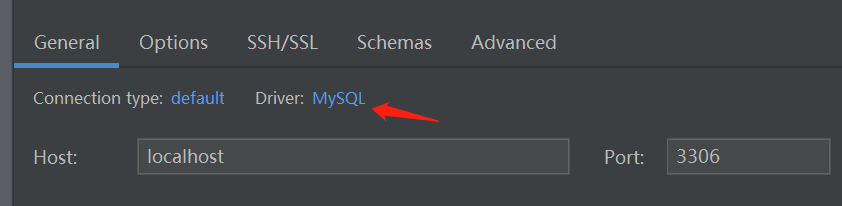
如图所示:选择驱动,点击mysql for 5.1
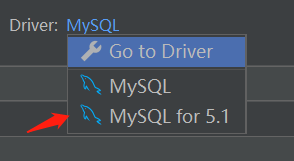
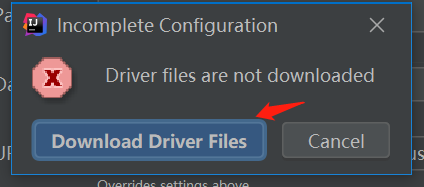
如图所示:选择下载驱动,点击download
如图所示:下载驱动,点击download driver files
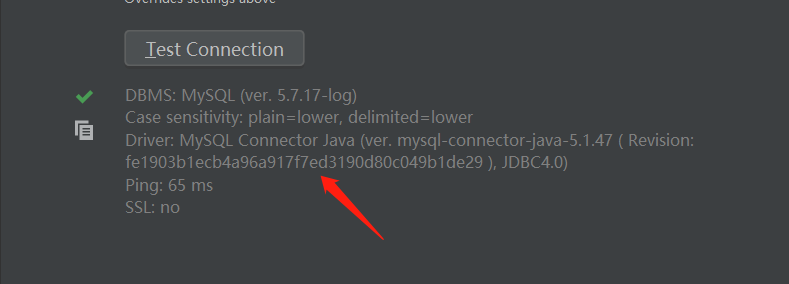
如图所示:点击test connection,显示如下的绿色打勾,还有提示内容,代表测试链接成功
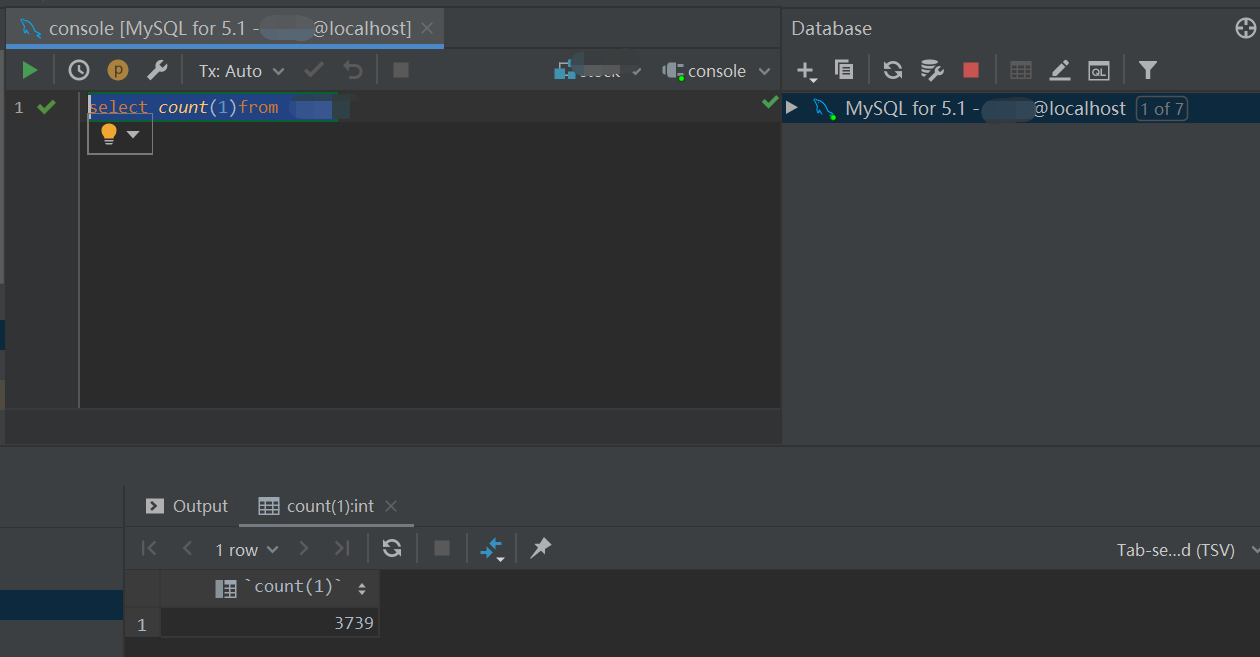
验证
如图所示:可以在窗口中直接写sql语句,并执行。
今天是持续写作的第 25 / 100 天。
可以关注我,点赞我、评论我、收藏我啦。
今天的文章idea连接mysql8.0数据库_java如何连接mysql数据库[通俗易懂]分享到此就结束了,感谢您的阅读。
版权声明:本文内容由互联网用户自发贡献,该文观点仅代表作者本人。本站仅提供信息存储空间服务,不拥有所有权,不承担相关法律责任。如发现本站有涉嫌侵权/违法违规的内容, 请发送邮件至 举报,一经查实,本站将立刻删除。
如需转载请保留出处:https://bianchenghao.cn/74766.html
![idea连接mysql8.0数据库_java如何连接mysql数据库[通俗易懂]插图1 image-20211221222513356](https://img.bianchenghao.cn/app/bianchenghao_cn/6766f89cd7684a86b887caee2a8d45c7.png)
![idea连接mysql8.0数据库_java如何连接mysql数据库[通俗易懂]插图3 image-20211221224838805](https://img.bianchenghao.cn/app/bianchenghao_cn/1999b388645749b5857c76aa8bfff5b4.png)
![idea连接mysql8.0数据库_java如何连接mysql数据库[通俗易懂]插图5 image-20211221222545780](https://img.bianchenghao.cn/app/bianchenghao_cn/4e2c62dc45024469864e34e3a65fd109.png)
![idea连接mysql8.0数据库_java如何连接mysql数据库[通俗易懂]插图7 image-20211221222617035](https://img.bianchenghao.cn/app/bianchenghao_cn/8877ccf3617b4915843f808f5ba61efa.png)
![idea连接mysql8.0数据库_java如何连接mysql数据库[通俗易懂]插图9 image-20211221222655111](https://img.bianchenghao.cn/app/bianchenghao_cn/f587527d8bcf45e5bfb34a6117627d5a.png)
![idea连接mysql8.0数据库_java如何连接mysql数据库[通俗易懂]插图11 image-20211221223324162](https://img.bianchenghao.cn/app/bianchenghao_cn/6236d4fe65ec455aab8095070f7580f0.png)
![idea连接mysql8.0数据库_java如何连接mysql数据库[通俗易懂]插图13 image-20211221223542160](https://img.bianchenghao.cn/app/bianchenghao_cn/e495822a087c4f7294c8cd4d558e8f1f.png)
![idea连接mysql8.0数据库_java如何连接mysql数据库[通俗易懂]插图15 image-20211221223608505](https://img.bianchenghao.cn/app/bianchenghao_cn/8b73d47a5d044b48abb8457022c9ff4b.png)
![idea连接mysql8.0数据库_java如何连接mysql数据库[通俗易懂]插图17 image-20211221223647237](https://img.bianchenghao.cn/app/bianchenghao_cn/43416643071149ff92aada1081146d84.png)
![idea连接mysql8.0数据库_java如何连接mysql数据库[通俗易懂]插图19 image-20211221223707458](https://img.bianchenghao.cn/app/bianchenghao_cn/c701b2ebecda4f619e8b68e4c136771e.png)
![idea连接mysql8.0数据库_java如何连接mysql数据库[通俗易懂]插图21 image-20211221223731224](https://img.bianchenghao.cn/app/bianchenghao_cn/99a0d7ec4fa942daa683c409e7c14382.png)
![idea连接mysql8.0数据库_java如何连接mysql数据库[通俗易懂]插图23 image-20211221223858221](https://img.bianchenghao.cn/app/bianchenghao_cn/1a88a0a2e34a4da593c66e315a607bd1.png)